CONTEXT
Reduced support tickets by 80% by giving non-technical users the power to handle their own data transformations.
My role
Lead product designer
Team
Timeline
September – November 2021
Tools
Sketch, InVision, Pendo
A little bit about MindBridge
MindBridge is a global leader in AI-powered financial risk intelligence, serving audit and finance professionals. The platform leverages artificial intelligence, machine learning, and statistical models to analyze 100% of financial transactions, detecting anomalies, errors, and potential fraud. This empowers organizations to strengthen internal controls, improve accuracy, and make more informed decisions.
As the lead product designer, I...
Conducted user research sessions with the data implementation team
Led design efforts for building intuitive file merge capabilities
Collaborated closely with PM and engineering to navigate technical constraints and
business prioritiesLed usability sessions with 3 customers to ensure the solution met their needs
THE PROBLEM
Users couldn’t easily merge their data files
Within the MindBridge platform, users manage their clients’ files in the File Manager before adding them to an analysis, and can reach out to support for help with any data transformations. Nearly half (46%) of these support requests were related to merging files — a simple but essential task that non-technical users couldn’t complete on their own. This created unnecessary workload for the support team and delayed users from accessing insights in the product.
RESEARCH
Understanding our users: Audit Associates on a tight deadline

Smaller firms needed to be more self-sufficient
Small to mid-sized audit firms often lacked internal data teams, relying heavily on our support for basic transformations. Giving these users the tools to self-serve would speed up their workflows and allow support to focus on complex, high-impact accounts.
Full automation wasn’t feasible for complex data
Variations in file structures — such as inconsistent headers and differing column orders — made a fully automated merge unreliable. The solution needed to balance automation with user control, allowing for review and adjustment where data inconsistencies existed.
Data arrived in varied formats and structures
Some users received data spread across multiple sheets within a single Excel file — for example, one sheet per month. These scenarios required splitting sheets into separate files before merging them. The design needed to accommodate different data structures and workflows to ensure all users could access the merge feature effectively.
Excel’s limitations forced users into workarounds
Even users who knew how to merge files in Excel often hit technical limits — Excel caps datasets at 1,048,576 rows. Larger clients with more extensive data had to split their exports into multiple files, such as one per quarter. The product needed to support these high-volume workflows that exceeded Excel’s native capabilities.
PROCESS
From user flows to high-fidelity prototypes
After synthesizing insights from our user research sessions, the Product Manager, Development Lead, and I conducted an initial prioritization exercise to identify which features and use cases we wanted to support for the first release.
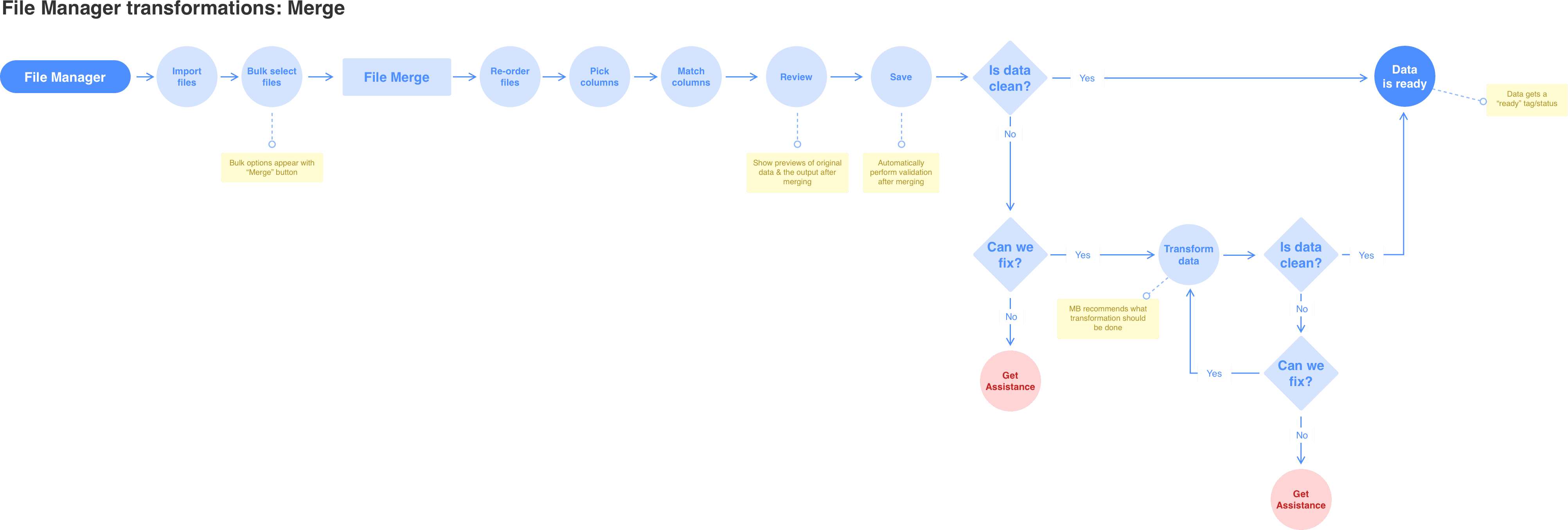
I began by mapping out the different scenarios we would need to solve for, since there could be multiple entry points into the file merge workflow. Using what I learned from research, I then outlined the step-by-step process the support team followed when manually merging files and started creating low-fidelity concepts for each step.
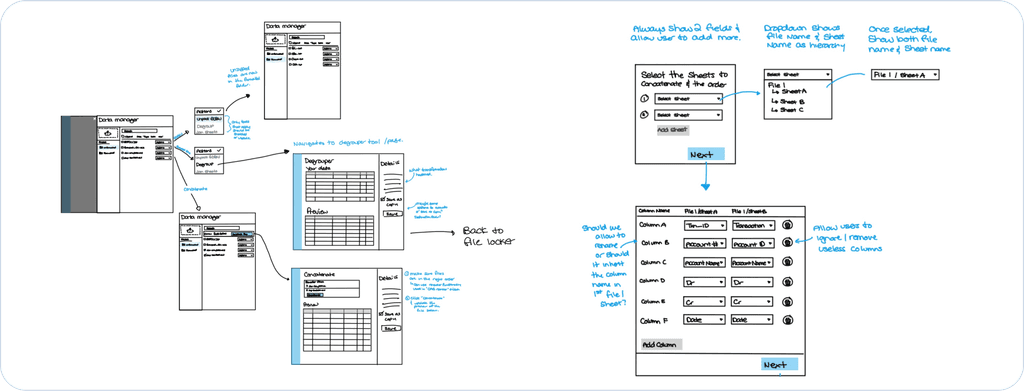
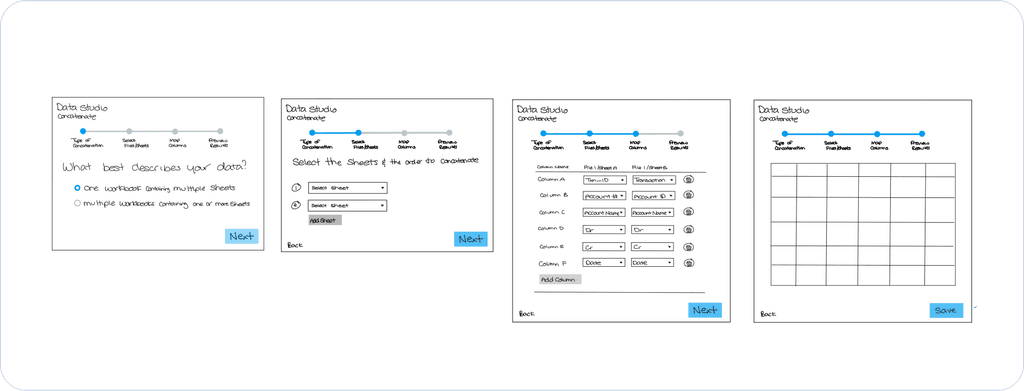
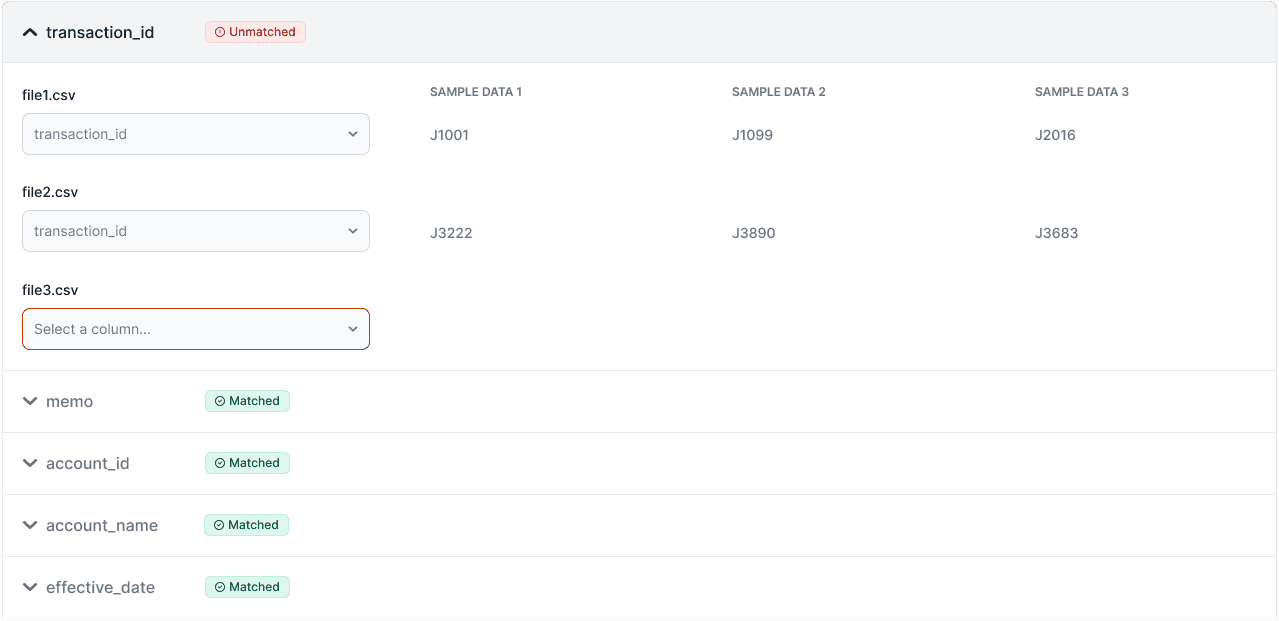
The Match Columns step proved to be the most challenging to design. I went through multiple iterations, gathering feedback from internal stakeholders along the way. In this step, users needed to define which column names corresponded across files. In most cases, this could be automated since column names were consistent — but when variations occurred, user input was required. We decided to treat the first imported file as the primary reference, allowing users to map subsequent files to the canonical columns in that file.
Here are some examples of the iterations I went through:
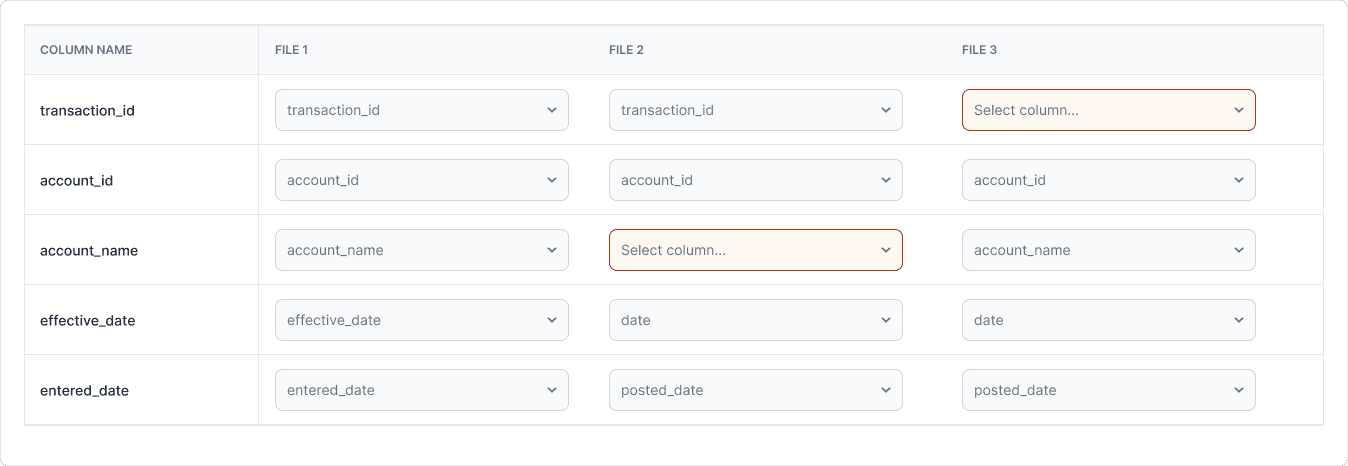
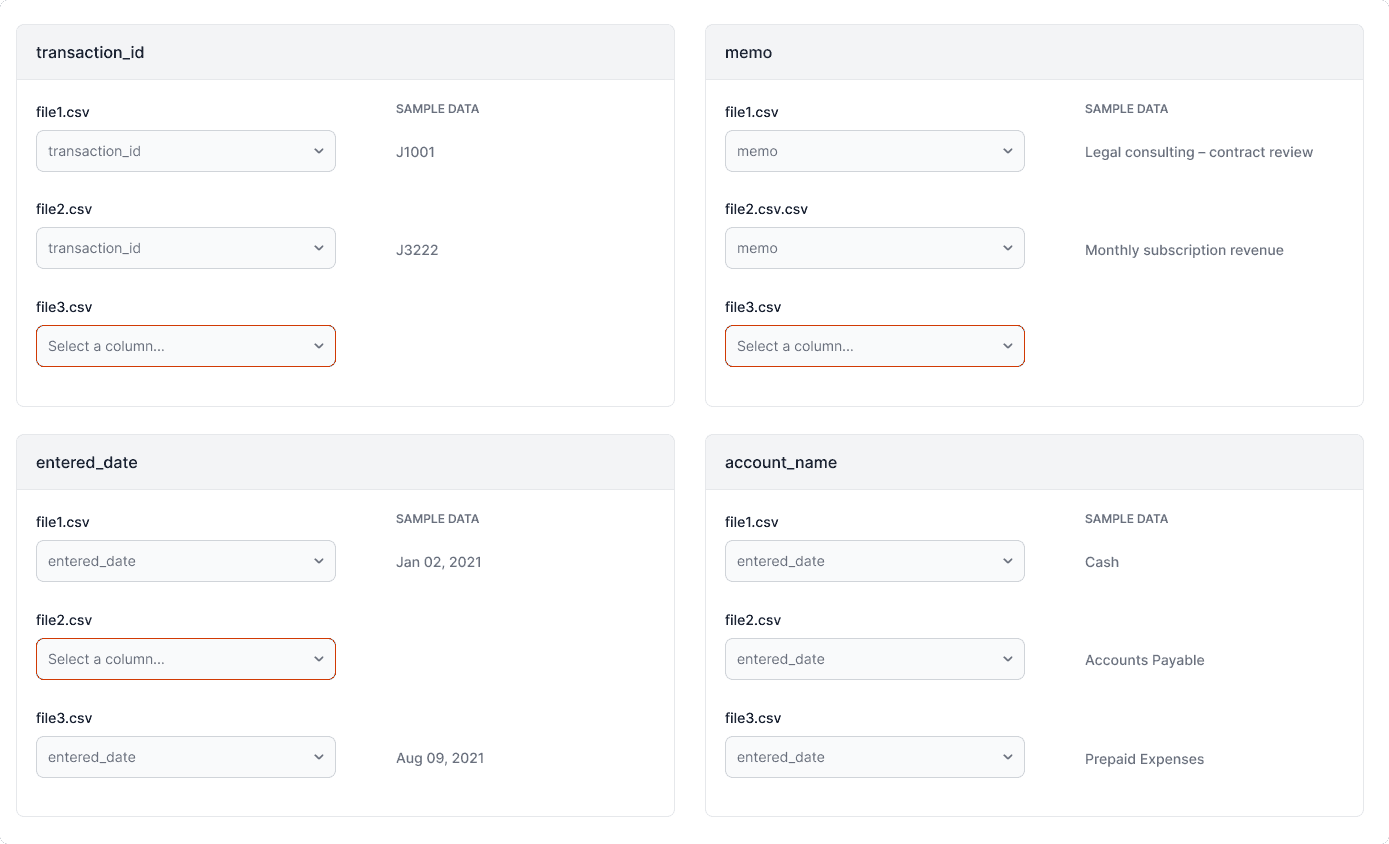
Once the team aligned on the overall approach, I created a high-fidelity clickable prototype for usability testing. We began with several rounds of internal testing with colleagues from different departments who weren’t familiar with data transformation workflows. This helped us surface and resolve obvious usability issues before involving real users.
Next, I partnered with the customer support team to identify users who had previously submitted support tickets related to file merging. Together, we recruited three users from different audit firms to participate in remote moderated usability testing sessions.
Remote moderated usability testing involves observing participants as they complete tasks using a prototype or live product — conducted via video call rather than in person. As the moderator, I guided participants through key workflows, asked open-ended questions to understand their thought process, and observed where they encountered friction or confusion.
The participants did not run into any major issues completing our tasks in the prototypes and overall the feedback was very positive.
Key insights
One participant suggested making the primary file whichever one has the most columns instead of the first file you’ve imported.
Two participants said on the Select Columns step, it would be nice to have to context on what the required columns are for the analysis this file will be used for.
Two participants suggested adding the ability to save a “merge template” so they could automatically re-use it next year for the same client. This was out of scope for the initial release but was added to the backlog as a future enhancement.
Following the usability sessions, we were able to action two of the key insights and include them in the initial release. I created robust handoff documentation in Confluence detailing every interaction, visual style, microcopy, and warning or error messages, along with guidance on how to handle edge cases. I also mapped out which UI elements required Pendo tagging to track feature usage and engagement post-launch.
Throughout development, we held a weekly sync where engineers shared progress and surfaced questions early. These sessions allowed me to provide feedback in real time, ensure implementation accuracy, and confirm that the solution met user needs and aligned with the intended experience.
These steps ensured a smooth and collaborative design-to-development process. By validating early concepts through testing, maintaining close communication with engineering, and documenting every detail for a seamless handoff, we delivered a well-tested, user-centered feature that balanced automation with control — empowering non-technical users to confidently merge their own data files.
SOLUTION
A Smarter, Simpler Way to Merge Data
I designed a guided workflow that simplified a complex, technical process into four intuitive steps — Order Files, Select Columns, Match Columns, and Review Data. The experience balanced automation with flexibility, allowing non-technical users to complete merges confidently and accurately.
Interactive prototype:
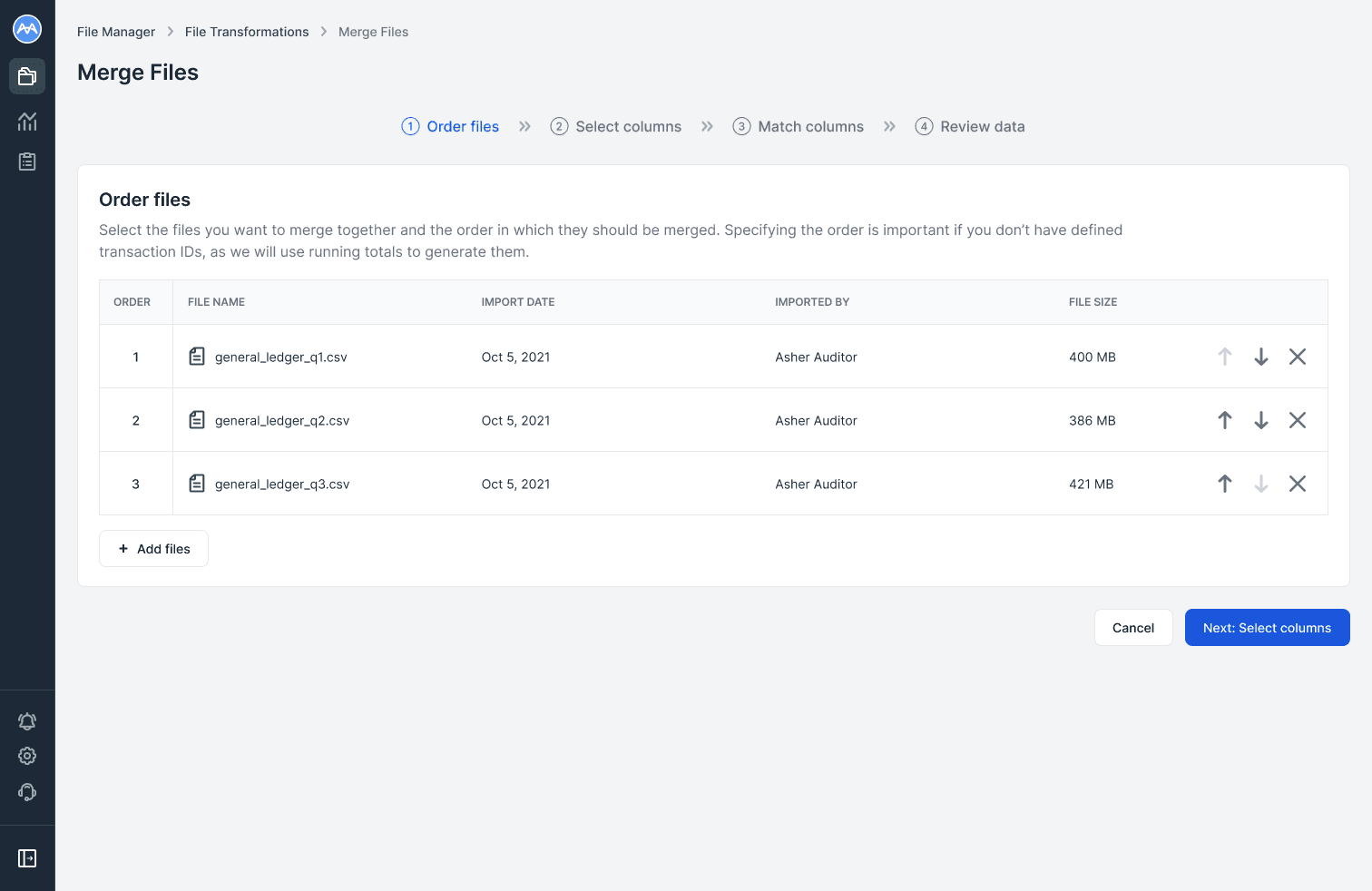
In the Order files step, users add files from the File Manager and arrange the merge order.
File order is important for scenarios like generating transaction IDs in a General Ledger Analysis, where running totals depend on the sequence of the data.
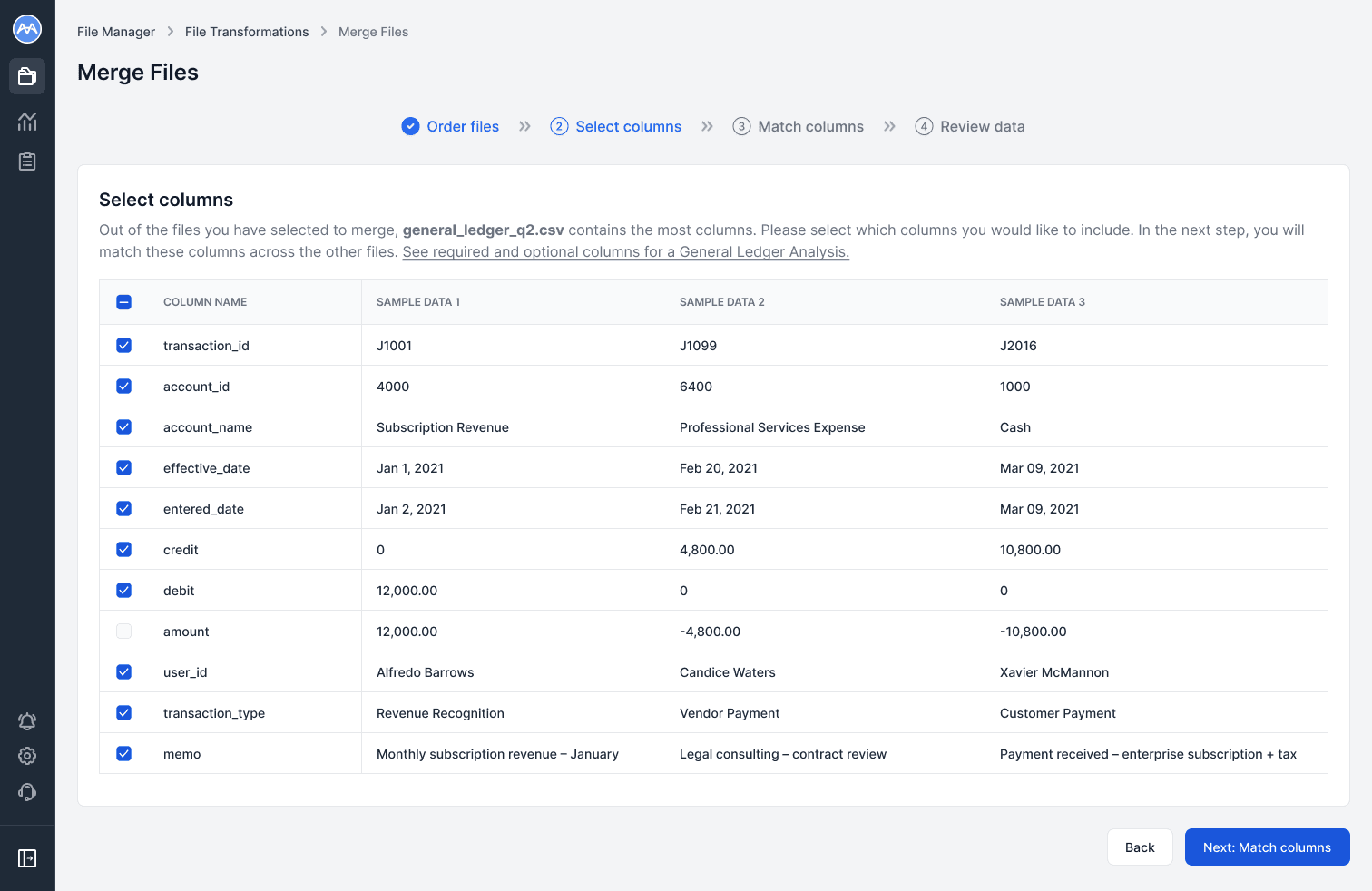
In the Select columns step, users choose which columns to include in the final merge. Three preview cells per column provide context when names aren’t intuitive.
Based on usability feedback, I added a link which opens a help article showing required and optional columns for the chosen analysis type, helping users ensure they include all relevant data.
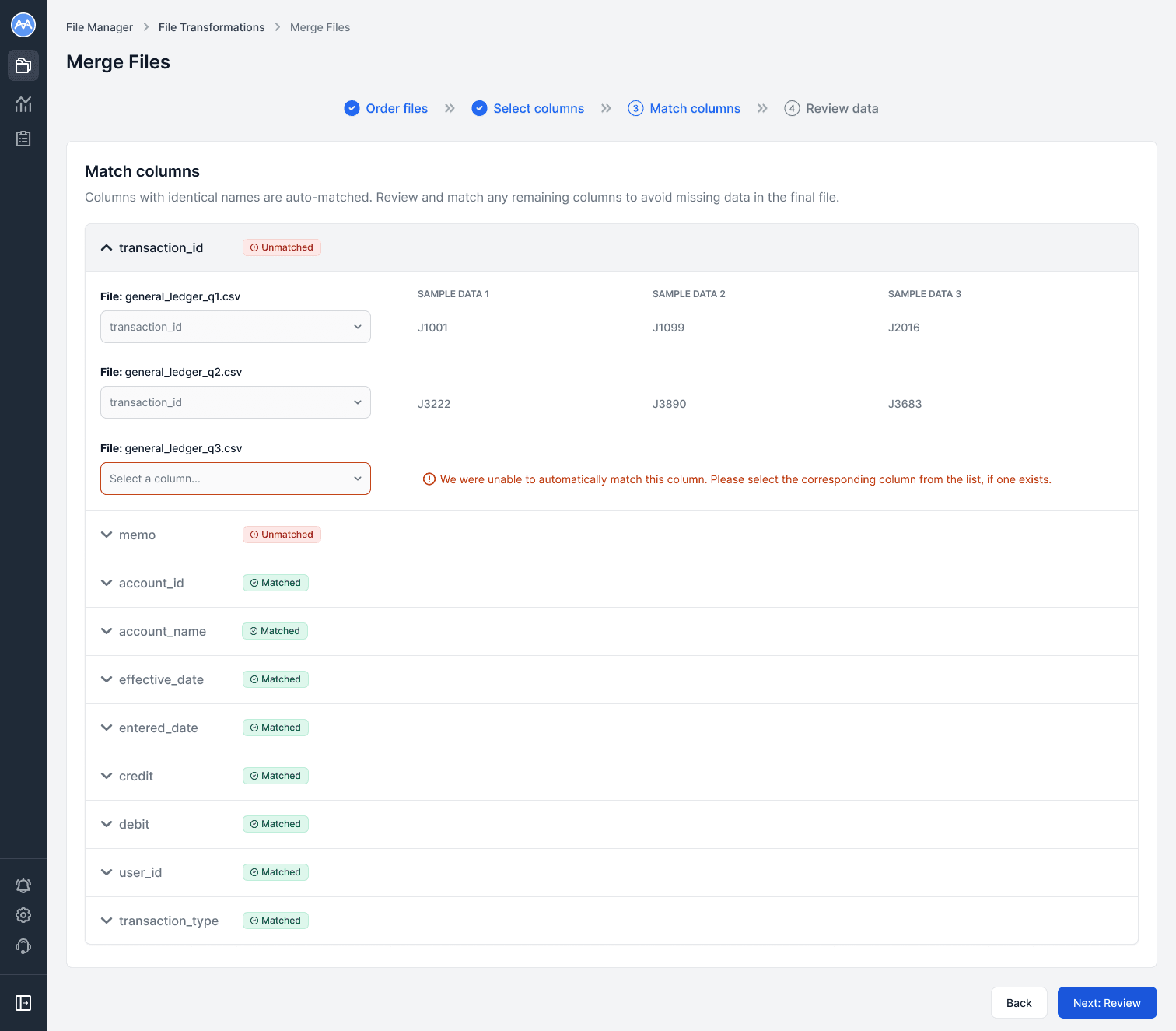
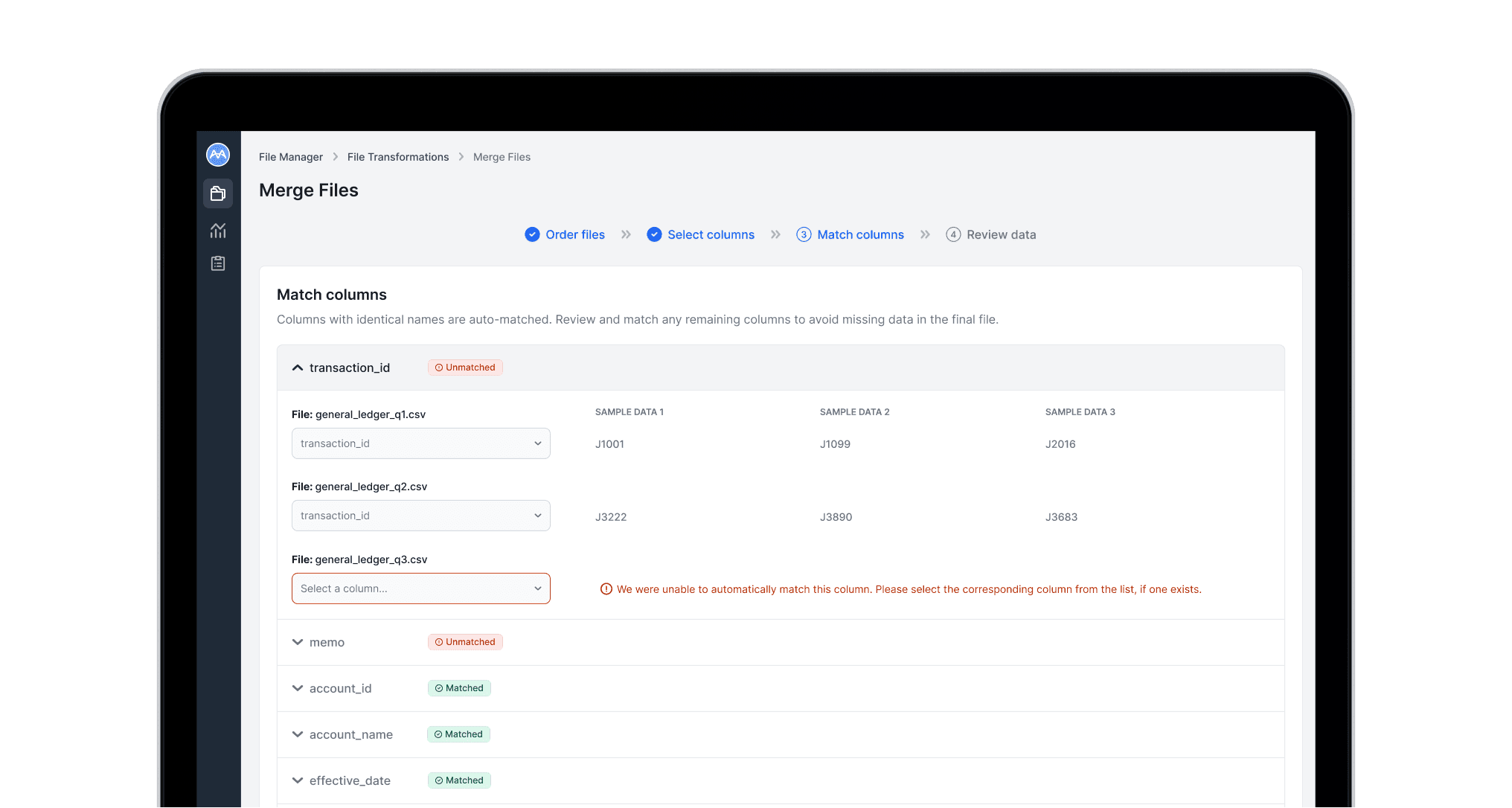
In the Match columns step, each column from the primary file is shown in an expandable section. Expanding reveals corresponding columns from the other files, with three sample cells for context.
Columns with identical names are automatically matched, while unmatched columns float to the top. A warning highlights files where matches could not be found, and users select the correct column from a filtered list of unmatched options.
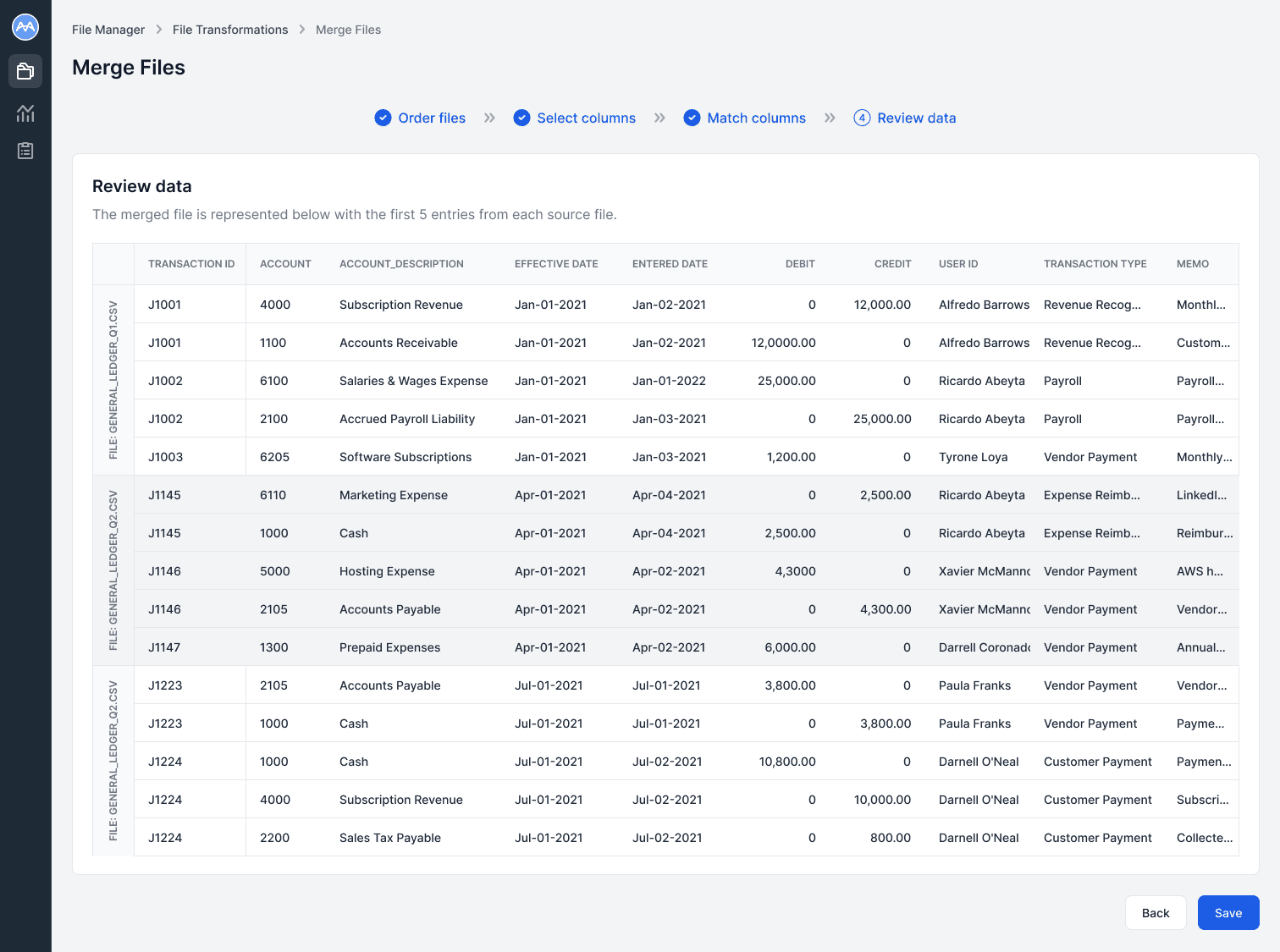
In the Review data step, users see a snapshot of the final merged file to verify accuracy, with the first five rows from each file providing enough context to ensure columns and data align correctly.
If the output looks correct, they can click Save to generate and store the final file in the File Manager.
If edits are needed, the Back button allows them to return to previous steps and make adjustments.
IMPACT
How the feature empowered users, reduced support load, and improved operational efficiency.
The File Merge feature delivered measurable results for both users and the business. Support tickets related to file merging dropped by 80%, with the remaining 20% of cases successfully directed to the in-tool merge functionality — most of these users were able to self-serve. The few cases that could not be resolved through the tool were due to other underlying data quality issues that needed attention alongside the merge.
Users found the workflow intuitive and easy to use, and the ability to self-serve helped them meet tight deadlines without waiting a day or more for support action. This improvement significantly reduced friction in their workflows and increased confidence in handling their own data.
For the business, the feature freed the support team to focus on higher-value clients and complex issues, reduced operational overhead, and laid the groundwork for scaling self-serve data operations across other workflows.
What I learned
Key learnings from this project reinforced that self-serve automation works best when paired with transparency and control, that early usability testing drives adoption and reduces post-launch support, and that flexible workflows are essential when working with varied data structures.
Next steps
Next steps include adding in merge templates, expanding the File Manager with additional data transformation operations, such as flattening grouped files, column transformations, and other capabilities to further empower users.